How to Deposit Money in Teen Patti Go – Payment Guide 2026
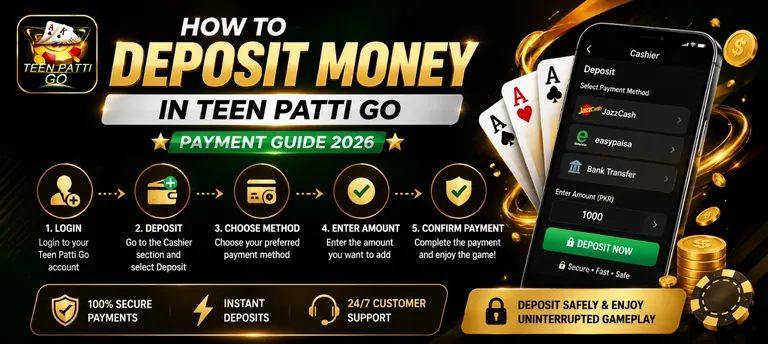
Before You Deposit on Teen Patti Go
An Active Account
You need to be registered and logged in first. See the registration guide if you haven’t signed up yet.
A Funded Wallet
Make sure your JazzCash or EasyPaisa balance covers the amount you plan to deposit.
Step-by-Step Deposit Guide
Deposit Limits
| Minimum Deposit | PKR 100 |
| Maximum per Transaction | PKR 50,000 |
| Payment Methods | JazzCash, EasyPaisa |
| Processing Time | Usually a few minutes |
Supported Payment Methods
JazzCash
Enter your JazzCash number, confirm the amount, and approve with your PIN.
EasyPaisa
Works the same way as JazzCash — enter your number, confirm, and approve.
Bank transfer is available for withdrawals, but not for deposits.
Deposit Safety Tips
Double-Check the Amount
Confirm the number before approving — deposits can’t easily be reversed once sent.
Use Your Own Wallet
Deposit from a JazzCash or EasyPaisa account registered in your own name to avoid delays or issues later.
Keep Your Payment Receipt
A screenshot of the transaction makes it much faster to resolve any issue with support.
Set a Budget First
Decide how much you’re comfortable depositing before you start, not while you’re already at a table.
Common Deposit Problems & Fixes
Deposit Not Reflecting
Wait a few minutes first, since most deposits take a little time to process. If it still hasn’t shown up after 10 minutes, contact support with your payment screenshot.
Payment Failed
Check that your JazzCash or EasyPaisa balance is enough to cover the amount, and confirm you entered the right number before trying again.
Deposit Button Not Working
Make sure you’re logged in and connected to the internet. If the issue continues, close and reopen the app.
Charged but Balance Didn’t Update
This is usually a delay, not a lost payment. Wait 10 minutes, then contact support with proof of payment if it still hasn’t appeared.
Deposit FAQs
What is the minimum deposit on Teen Patti Go?
How long does a deposit take to reach my Teen Patti Go wallet?
Can I deposit into Teen Patti Go using bank transfer?
Does Teen Patti Go charge a deposit fee?
What happens if I enter the wrong deposit amount?
Conclusion
Depositing on Teen Patti Go is a quick process — pick JazzCash or EasyPaisa, enter an amount between PKR 100 and PKR 50,000, and confirm with your PIN. Most deposits land in your wallet within a few minutes, ready to use at any table. If one ever gets stuck, wait a short while first, and support can sort it out with your payment receipt if it’s still missing.
Explore More
How to Withdraw
Ready to cash out instead? See the withdrawal guide.
Full Guide
Features, games, bonuses, and more — see the complete Teen Patti Go guide.